DigiYatra
Designing a Smoother Border Experience for Millions of Travelers
I led UX for DigiYatra’s Landport app—making border crossings 60% faster with biometric onboarding, privacy-first design, and support in multiple languages
Year :
2025
Industry :
Real Estate
Client :
VistaHaven
Project Duration :
2 weeks
Project Summary & Mission
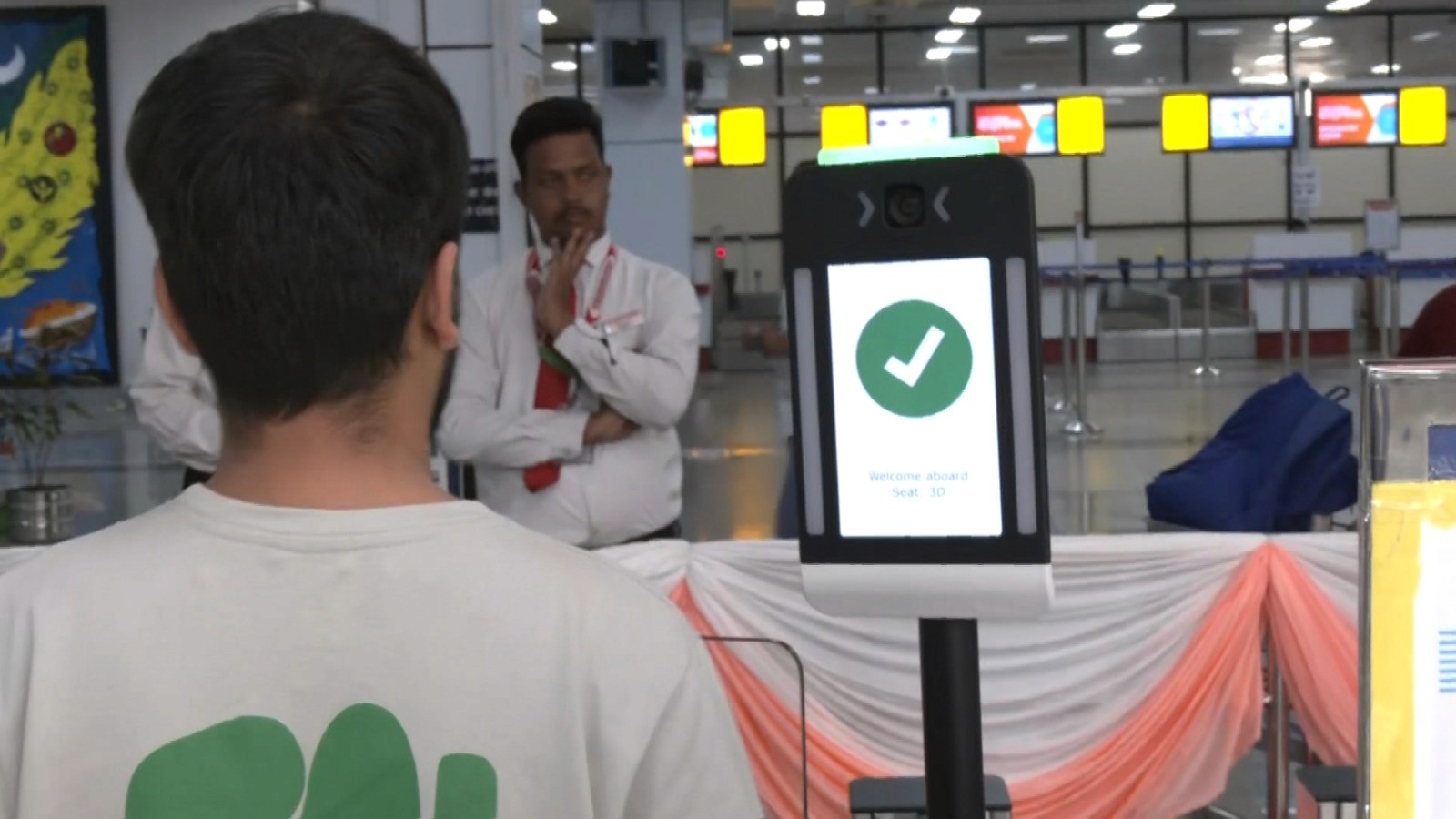
In 2023–2024, I served as UX Manager for Landport, DigiYatra’s next-generation mobile passport control solution for land crossings. My goal: replace slow, error-ridden manual checks with a four-step digital onboarding journey via QR scan, NFC passport read, and secure face recognition. The platform had to improve throughput and satisfaction while meeting strict privacy (GDPR, ISO 27001) and accessibility requirements across multi-agency, multi-country deployments.
Impact:
60% reduction in average border wait time
2× improvement in user satisfaction (CSAT)
Full compliance with GDPR, ISO 27001, and government security mandates
The Problem at the Border
Traveler Pain Points:
Long Queues: Traditional border checks saw 30–60 minute waits, especially for families and cross-border workers.
Manual Errors: Handwriting checks, paperwork, and language confusion resulted in frequent processing errors.
Language Barriers: Many travelers did not speak the local official languages; signs and instructions led to bottlenecks and stress.
Operational Headaches:
Border officers required multi-device setups and manual reviews, making their work slow, fatiguing, and error-prone.
Multiple government agencies imposed different privacy, audit, and reporting standards.

My Role & Stakeholder Collaboration
Role: UX Manager
Team:
3 UI/UX designers, 2 content strategists
7 mobile/backend devs (government vendor)
AI/biometrics leads
Immigration, border agency, and privacy/compliance stakeholders
Field input from actual border officers and travelers
Process:
Led stakeholder alignment workshops and experience mapping with commuters, multi-language family groups, and border staff.
Rapid prototyping, usability testing at local border crossings, and field pilots with real travelers.
Research & User Persona Mapping
Methods:
Field observation at 3 major border checkpoints
Interviews with family travelers, daily commuters, and cross-border workers
Language fluency, accessibility, and device survey (smartphone use, vision/literacy constraints)
Key Personas:
Frequent Commuters: Prioritize speed, want no-nonsense repeatable flow
Family Travelers: Need group onboarding, language support, and help for kids/elderly
Non-native Speakers: Require pictograms and accessible step-by-step instructions
UX Strategy: Speed, Simplicity, Privacy, and Accessibility
Speed: Every action designed for completion in 30 seconds or less. Streamlined flows minimize taps, loading, and re-entry.
Simplicity: Visual cue hierarchy with pictograms, color-coded steps, “good lighting” photo tips, one-message-at-a-time guidance.
Privacy: On-device biometric processing (no images sent to server), auto-wipe after crossing, opt-in data use, plain-language consent dialogs. Full GDPR/ISO 27001 compliance.
Accessibility: Large tap targets, assistive text/audio prompts, language toggles for major (and minority) tongues, high-contrast color options, screen reader support.
Journey Breakdown: The Four-Step Flow
1. QR Onboarding
Travelers receive a QR (email, printed ticket, kiosk, or from home).
Scan in-app for instant pre-filling of trip ID, name, and nationality.
Fallback: Manual code entry or camera scan of printed QR codes.
2. NFC Chip Read
Tap passport to phone; secure NFC reads identity, photo, and visa info.
Real-time “reading...” animation, success feedback, human-language error handling (“Move passport closer”) with illustrated tips.
Fallback: Manual MRZ (Machine Readable Zone) input, officer intervention.
3. Face Recognition & Liveness
Selfie prompt guides with adaptive feedback (“Raise camera,” “Better lighting”).
On-device face match to NFC photo, anti-spoofing checks, confidence feedback (“99% match”).
Accessibility: Includes “skip selfie” alternative (send to officer) for face-related accessibility needs.
Failure: Retake prompt, then fallback to manual review by agent.
4. Gate Pass Generation
Instant digital pass or QR for barrier/agent scan
Family/group option: Add dependents in same flow, with batch gate pass
Status tracker for “awaiting clearance,” “ready,” “needs officer help”
UX Features in Action
Multilingual UI: Real-time language switching, government-approved translations, no reliance on literacy.
Pictograms: Every instruction supported by universally recognisable images/icons.
Family Flow: “Add traveler” process; one scan for all dependents with color-coded badges.
Error Handling & Fallback: Every biometric step includes a backup—PIN entry, manual MRZ, paper fallback, assisted kiosk path.
Assisted/Accessibility Mode: Toggled at any point, enables voice-over, larger controls, and simplified instructions.
Physical-Digital Hybrid: Kiosk handoff, manual override for tech failure, clear signposting for non-smartphone users.
Security Architecture: Compliance by Design
Data Storage: No personal biometrics stored post-clearance; encrypted on-device until gate scan, then auto-deleted.
On-Device Processing: All facial recognition and NFC reads are performed locally, preventing data-in-transit risks.
Audit Logging: Only minimal, non-identifiable logs for compliance.
Consent Management: Travelers must review and consent (in their language) before any biometric capture.
Multi-Jurisdiction Compliance: Sync with GDPR, ISO 27001, and specific landport privacy standards.
Measurable Outcomes
Metric | Before (Manual) | After (Landport) | Change |
Average Wait Time | 38 min | 15 min | –60% |
Error Rate | 8% | 2% | –75% |
Traveler Satisfaction (CSAT) | 2.7 / 5 | 4.6 / 5 | +70% |
Family Processing | 20+ min | 7 min | –65% |
Staff Task Switches | 4+ apps | 1 app | Simplified |
Future Opportunities
Visa/Residency Status Integration: Seamless check-in by syncing with government e-visa and permit databases.
Air/Rail/BUS Modalities: Expand to airport, train, or bus onboarding for multimodal travel journeys.
Digital Wallet Export: Add to Apple/Google Wallet for one-tap entry.
Remote Pre-Clearance: “At-home onboarding” for frequent travelers.
Dynamic Policy Updates: Push live regulatory changes (e.g., COVID alerts) directly to user flows.
Key Lessons
Trust by Transparency: Plain-language privacy prompts and clear on-device processing features were essential to build user (and regulator) confidence.
Volume at Speed: Modular, error-tolerant journeys outperformed rigid ones in real field tests—real-world conditions are unpredictable.
Universal Design: Visual-first, language-light UI with robust accessibility was vital for inclusivity and regulatory approval, not just a “nice to have.”
Always a Backup: Manual fallback options at each tech step maintained trust during device/NFC/biometric errors—no digital dead-ends.
Systemic Collaboration: Success required aligning government privacy mandates, on-the-ground staff, technologists, and the realities of border crowds.
More Projects





DigiYatra
Designing a Smoother Border Experience for Millions of Travelers
I led UX for DigiYatra’s Landport app—making border crossings 60% faster with biometric onboarding, privacy-first design, and support in multiple languages
Year :
2025
Industry :
Real Estate
Client :
VistaHaven
Project Duration :
2 weeks
Project Summary & Mission
In 2023–2024, I served as UX Manager for Landport, DigiYatra’s next-generation mobile passport control solution for land crossings. My goal: replace slow, error-ridden manual checks with a four-step digital onboarding journey via QR scan, NFC passport read, and secure face recognition. The platform had to improve throughput and satisfaction while meeting strict privacy (GDPR, ISO 27001) and accessibility requirements across multi-agency, multi-country deployments.
Impact:
60% reduction in average border wait time
2× improvement in user satisfaction (CSAT)
Full compliance with GDPR, ISO 27001, and government security mandates
The Problem at the Border
Traveler Pain Points:
Long Queues: Traditional border checks saw 30–60 minute waits, especially for families and cross-border workers.
Manual Errors: Handwriting checks, paperwork, and language confusion resulted in frequent processing errors.
Language Barriers: Many travelers did not speak the local official languages; signs and instructions led to bottlenecks and stress.
Operational Headaches:
Border officers required multi-device setups and manual reviews, making their work slow, fatiguing, and error-prone.
Multiple government agencies imposed different privacy, audit, and reporting standards.
My Role & Stakeholder Collaboration
Role: UX Manager
Team:
3 UI/UX designers, 2 content strategists
7 mobile/backend devs (government vendor)
AI/biometrics leads
Immigration, border agency, and privacy/compliance stakeholders
Field input from actual border officers and travelers
Process:
Led stakeholder alignment workshops and experience mapping with commuters, multi-language family groups, and border staff.
Rapid prototyping, usability testing at local border crossings, and field pilots with real travelers.
Research & User Persona Mapping
Methods:
Field observation at 3 major border checkpoints
Interviews with family travelers, daily commuters, and cross-border workers
Language fluency, accessibility, and device survey (smartphone use, vision/literacy constraints)
Key Personas:
Frequent Commuters: Prioritize speed, want no-nonsense repeatable flow
Family Travelers: Need group onboarding, language support, and help for kids/elderly
Non-native Speakers: Require pictograms and accessible step-by-step instructions
UX Strategy: Speed, Simplicity, Privacy, and Accessibility
Speed: Every action designed for completion in 30 seconds or less. Streamlined flows minimize taps, loading, and re-entry.
Simplicity: Visual cue hierarchy with pictograms, color-coded steps, “good lighting” photo tips, one-message-at-a-time guidance.
Privacy: On-device biometric processing (no images sent to server), auto-wipe after crossing, opt-in data use, plain-language consent dialogs. Full GDPR/ISO 27001 compliance.
Accessibility: Large tap targets, assistive text/audio prompts, language toggles for major (and minority) tongues, high-contrast color options, screen reader support.
Journey Breakdown: The Four-Step Flow
1. QR Onboarding
Travelers receive a QR (email, printed ticket, kiosk, or from home).
Scan in-app for instant pre-filling of trip ID, name, and nationality.
Fallback: Manual code entry or camera scan of printed QR codes.
2. NFC Chip Read
Tap passport to phone; secure NFC reads identity, photo, and visa info.
Real-time “reading...” animation, success feedback, human-language error handling (“Move passport closer”) with illustrated tips.
Fallback: Manual MRZ (Machine Readable Zone) input, officer intervention.
3. Face Recognition & Liveness
Selfie prompt guides with adaptive feedback (“Raise camera,” “Better lighting”).
On-device face match to NFC photo, anti-spoofing checks, confidence feedback (“99% match”).
Accessibility: Includes “skip selfie” alternative (send to officer) for face-related accessibility needs.
Failure: Retake prompt, then fallback to manual review by agent.
4. Gate Pass Generation
Instant digital pass or QR for barrier/agent scan
Family/group option: Add dependents in same flow, with batch gate pass
Status tracker for “awaiting clearance,” “ready,” “needs officer help”
UX Features in Action
Multilingual UI: Real-time language switching, government-approved translations, no reliance on literacy.
Pictograms: Every instruction supported by universally recognisable images/icons.
Family Flow: “Add traveler” process; one scan for all dependents with color-coded badges.
Error Handling & Fallback: Every biometric step includes a backup—PIN entry, manual MRZ, paper fallback, assisted kiosk path.
Assisted/Accessibility Mode: Toggled at any point, enables voice-over, larger controls, and simplified instructions.
Physical-Digital Hybrid: Kiosk handoff, manual override for tech failure, clear signposting for non-smartphone users.
Security Architecture: Compliance by Design
Data Storage: No personal biometrics stored post-clearance; encrypted on-device until gate scan, then auto-deleted.
On-Device Processing: All facial recognition and NFC reads are performed locally, preventing data-in-transit risks.
Audit Logging: Only minimal, non-identifiable logs for compliance.
Consent Management: Travelers must review and consent (in their language) before any biometric capture.
Multi-Jurisdiction Compliance: Sync with GDPR, ISO 27001, and specific landport privacy standards.
Measurable Outcomes
Metric | Before (Manual) | After (Landport) | Change |
Average Wait Time | 38 min | 15 min | –60% |
Error Rate | 8% | 2% | –75% |
Traveler Satisfaction (CSAT) | 2.7 / 5 | 4.6 / 5 | +70% |
Family Processing | 20+ min | 7 min | –65% |
Staff Task Switches | 4+ apps | 1 app | Simplified |
Future Opportunities
Visa/Residency Status Integration: Seamless check-in by syncing with government e-visa and permit databases.
Air/Rail/BUS Modalities: Expand to airport, train, or bus onboarding for multimodal travel journeys.
Digital Wallet Export: Add to Apple/Google Wallet for one-tap entry.
Remote Pre-Clearance: “At-home onboarding” for frequent travelers.
Dynamic Policy Updates: Push live regulatory changes (e.g., COVID alerts) directly to user flows.
Key Lessons
Trust by Transparency: Plain-language privacy prompts and clear on-device processing features were essential to build user (and regulator) confidence.
Volume at Speed: Modular, error-tolerant journeys outperformed rigid ones in real field tests—real-world conditions are unpredictable.
Universal Design: Visual-first, language-light UI with robust accessibility was vital for inclusivity and regulatory approval, not just a “nice to have.”
Always a Backup: Manual fallback options at each tech step maintained trust during device/NFC/biometric errors—no digital dead-ends.
Systemic Collaboration: Success required aligning government privacy mandates, on-the-ground staff, technologists, and the realities of border crowds.
More Projects
DigiYatra
Designing a Smoother Border Experience for Millions of Travelers
I led UX for DigiYatra’s Landport app—making border crossings 60% faster with biometric onboarding, privacy-first design, and support in multiple languages
Year :
2025
Industry :
Real Estate
Client :
VistaHaven
Project Duration :
2 weeks
Project Summary & Mission
In 2023–2024, I served as UX Manager for Landport, DigiYatra’s next-generation mobile passport control solution for land crossings. My goal: replace slow, error-ridden manual checks with a four-step digital onboarding journey via QR scan, NFC passport read, and secure face recognition. The platform had to improve throughput and satisfaction while meeting strict privacy (GDPR, ISO 27001) and accessibility requirements across multi-agency, multi-country deployments.
Impact:
60% reduction in average border wait time
2× improvement in user satisfaction (CSAT)
Full compliance with GDPR, ISO 27001, and government security mandates
The Problem at the Border
Traveler Pain Points:
Long Queues: Traditional border checks saw 30–60 minute waits, especially for families and cross-border workers.
Manual Errors: Handwriting checks, paperwork, and language confusion resulted in frequent processing errors.
Language Barriers: Many travelers did not speak the local official languages; signs and instructions led to bottlenecks and stress.
Operational Headaches:
Border officers required multi-device setups and manual reviews, making their work slow, fatiguing, and error-prone.
Multiple government agencies imposed different privacy, audit, and reporting standards.
My Role & Stakeholder Collaboration
Role: UX Manager
Team:
3 UI/UX designers, 2 content strategists
7 mobile/backend devs (government vendor)
AI/biometrics leads
Immigration, border agency, and privacy/compliance stakeholders
Field input from actual border officers and travelers
Process:
Led stakeholder alignment workshops and experience mapping with commuters, multi-language family groups, and border staff.
Rapid prototyping, usability testing at local border crossings, and field pilots with real travelers.
Research & User Persona Mapping
Methods:
Field observation at 3 major border checkpoints
Interviews with family travelers, daily commuters, and cross-border workers
Language fluency, accessibility, and device survey (smartphone use, vision/literacy constraints)
Key Personas:
Frequent Commuters: Prioritize speed, want no-nonsense repeatable flow
Family Travelers: Need group onboarding, language support, and help for kids/elderly
Non-native Speakers: Require pictograms and accessible step-by-step instructions
UX Strategy: Speed, Simplicity, Privacy, and Accessibility
Speed: Every action designed for completion in 30 seconds or less. Streamlined flows minimize taps, loading, and re-entry.
Simplicity: Visual cue hierarchy with pictograms, color-coded steps, “good lighting” photo tips, one-message-at-a-time guidance.
Privacy: On-device biometric processing (no images sent to server), auto-wipe after crossing, opt-in data use, plain-language consent dialogs. Full GDPR/ISO 27001 compliance.
Accessibility: Large tap targets, assistive text/audio prompts, language toggles for major (and minority) tongues, high-contrast color options, screen reader support.
Journey Breakdown: The Four-Step Flow
1. QR Onboarding
Travelers receive a QR (email, printed ticket, kiosk, or from home).
Scan in-app for instant pre-filling of trip ID, name, and nationality.
Fallback: Manual code entry or camera scan of printed QR codes.
2. NFC Chip Read
Tap passport to phone; secure NFC reads identity, photo, and visa info.
Real-time “reading...” animation, success feedback, human-language error handling (“Move passport closer”) with illustrated tips.
Fallback: Manual MRZ (Machine Readable Zone) input, officer intervention.
3. Face Recognition & Liveness
Selfie prompt guides with adaptive feedback (“Raise camera,” “Better lighting”).
On-device face match to NFC photo, anti-spoofing checks, confidence feedback (“99% match”).
Accessibility: Includes “skip selfie” alternative (send to officer) for face-related accessibility needs.
Failure: Retake prompt, then fallback to manual review by agent.
4. Gate Pass Generation
Instant digital pass or QR for barrier/agent scan
Family/group option: Add dependents in same flow, with batch gate pass
Status tracker for “awaiting clearance,” “ready,” “needs officer help”
UX Features in Action
Multilingual UI: Real-time language switching, government-approved translations, no reliance on literacy.
Pictograms: Every instruction supported by universally recognisable images/icons.
Family Flow: “Add traveler” process; one scan for all dependents with color-coded badges.
Error Handling & Fallback: Every biometric step includes a backup—PIN entry, manual MRZ, paper fallback, assisted kiosk path.
Assisted/Accessibility Mode: Toggled at any point, enables voice-over, larger controls, and simplified instructions.
Physical-Digital Hybrid: Kiosk handoff, manual override for tech failure, clear signposting for non-smartphone users.
Security Architecture: Compliance by Design
Data Storage: No personal biometrics stored post-clearance; encrypted on-device until gate scan, then auto-deleted.
On-Device Processing: All facial recognition and NFC reads are performed locally, preventing data-in-transit risks.
Audit Logging: Only minimal, non-identifiable logs for compliance.
Consent Management: Travelers must review and consent (in their language) before any biometric capture.
Multi-Jurisdiction Compliance: Sync with GDPR, ISO 27001, and specific landport privacy standards.
Measurable Outcomes
Metric | Before (Manual) | After (Landport) | Change |
Average Wait Time | 38 min | 15 min | –60% |
Error Rate | 8% | 2% | –75% |
Traveler Satisfaction (CSAT) | 2.7 / 5 | 4.6 / 5 | +70% |
Family Processing | 20+ min | 7 min | –65% |
Staff Task Switches | 4+ apps | 1 app | Simplified |
Future Opportunities
Visa/Residency Status Integration: Seamless check-in by syncing with government e-visa and permit databases.
Air/Rail/BUS Modalities: Expand to airport, train, or bus onboarding for multimodal travel journeys.
Digital Wallet Export: Add to Apple/Google Wallet for one-tap entry.
Remote Pre-Clearance: “At-home onboarding” for frequent travelers.
Dynamic Policy Updates: Push live regulatory changes (e.g., COVID alerts) directly to user flows.
Key Lessons
Trust by Transparency: Plain-language privacy prompts and clear on-device processing features were essential to build user (and regulator) confidence.
Volume at Speed: Modular, error-tolerant journeys outperformed rigid ones in real field tests—real-world conditions are unpredictable.
Universal Design: Visual-first, language-light UI with robust accessibility was vital for inclusivity and regulatory approval, not just a “nice to have.”
Always a Backup: Manual fallback options at each tech step maintained trust during device/NFC/biometric errors—no digital dead-ends.
Systemic Collaboration: Success required aligning government privacy mandates, on-the-ground staff, technologists, and the realities of border crowds.